3 Route planning
 Mandatory / Mandatory /
 Optional Elements Optional Elements |
Transfer file
|
| Units (Metric) |
Coordinate and elevation system
|
Base point
|
| Project |
"bSI_codings" extension
type coding system(s)
|
Application
|
| Authors |
Alignments collection
min. one continuous stationed chainage |
Alignment
|
| Geometry (according to the described item) |
| *1) |
Line (horizontal geometry) |
| *2) |
Line string
|
| *1) |
Circular arc (horizontal geometry) |
| *1) |
Transition curve (horizontal geometry) |
| Vertical profile (according to described item) |
Vertical geometry
|
| *1) |
Point of vertical intersection (vertical geometry) |
| *1) |
Parabolic curve (vertical geometry) |
| *1) |
Circular curve (vertical geometry) |
"bSI_coding" extension
type coding alignment
|
"bSI_stringlineLayers" extension
string line model
|
"bSI_stringlineLayer" extension
string line model layer - lines and name of layer
|
"bSI_coding" extension
type coding string line layer
|
"bSI_plan" extension
plan information
|
| Collection of planimetric features |
| Planimetric feature such as building footprint |
| Plan feature geometry |
| Line (geom. line) |
| Line string |
| Circular arc (geom. line) |
| Transition curve (geom. line) |
| Plan feature location |
"bSI_planfeature" extension
plan feature details |
"bSI_coding" extension
type coding planfeature |
"bSI_plan" extension
plan information |
Roadways collection
|
Individual roadway
|
| Bridge location on the roadway |
| Planimetric feature such as building footprint |
| Plan feature geometry |
| Line (geom. line) |
| Line string |
| Circular arc (geom. line) |
| Transition curve (geom. line) |
| Plan feature location |
"bSI_planfeature" extension
plan feature details |
"bSI_coding" extension
type coding planfeature |
| Surface group |
| Surface |
Source data
|
Breaklines
|
| Breakline |
3D point list
|
"bSI_coding" extension
type coding break line
|
Random points
|
3D point list
|
"bSI_coding" extension
type coding random points
|
Surface description
|
| Vertices |
| Vertex |
| Faces |
Face
|
"bSI_coding" extension
type coding surface
|
"bSI_plan" extension
plan information
|
Extension definition dictionary
|
3.1 Contents
The general route data contains the following concepts:
 route (roadway), existing or planned
main geometry (horizontal and vertical alignments)
auxiliary geometry lines (string lines)
surface geometry (string line layers, surfaces, cross sections)
structural layers (string line layers, surfaces, cross sections)
bridge locations (bridge elements)
planimetric features
plan information
type coding
Routes encompass highways, local roads and private roads, waterways and railways, and any number of these (existing or planned) may appear in a project under a <Roadways> collection as several <Roadway> elements. Each route has one continuous stationing reference alignment and a vertical alignment. A route plan may also have further geometric representations as parametric route alignments, their collections as stringline models, cross-section representations, or surface models as triangulated meshes.
Attributes of the roadways collection <Roadways> are not used.
Each roadway has a unique name that relates it with the <Alignments> collection where the route geometric description is found and referenced by alignmentRefs attribute; additionally, optional description desc and state can be set.
Attributes of a roadway <Roadway>:
 |
name |
unique name |
e.g. [E18]
Note: this shall match the <Alignments>.name of the alignment group where the alignment referenced by alignmentRefs is found |
|
alignmentRefs |
reference to <Alignment>.name |
e.g. [stationing reference line] |
 |
desc |
description |
e.g. [Route E18 road signage footing plans] |
|
state |
state |
[abandoned]
[destroyed]
[existing]
[proposed] |
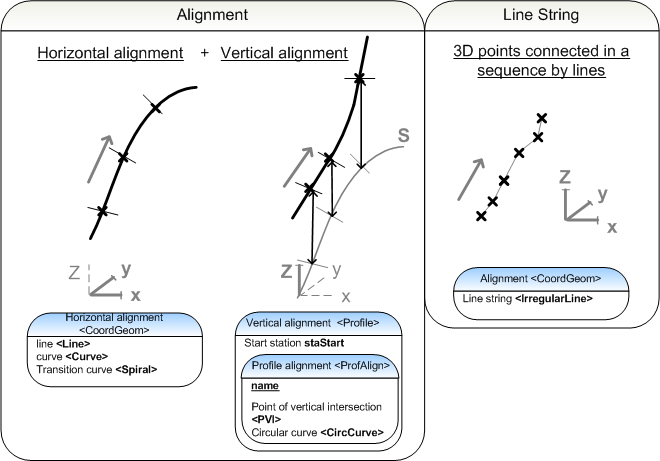
An alignment group <Alignments> consists of several alignments <Alignment>. Alignments can be described in two ways:
Geometric alignment (as hierarchy *1)
Line string (as hierarchy *2)
Geometric alignments describe parameters of the horizontal and vertical elements of an alignment. A line string
is a description where consequtive points are connected by line
segments. Geometric alignments are typicaly used to describe the stationing reference line of a road as well as other important geometric
descriptions such as road edges. Other route components are usually
described as line strings.
Once the alignments have been described, it is possible to assign them to a line
string model, that contains a description of the layers of the route
structure. Alternatively, a surface model of the route is a triangular mesh
representation of the surface structure of the route. The structural
model describes all the layers in a route structure as triangle mesh
surfaces.
Cross-sectional parameters, which are described in
further detail in the sections covering each route type, complement the
route description with parametric information of the cross-sections.
Route description
Route description is driven by stationing reference line (principal alignment). Other geometry lines are given in the same alignment collection <Alignments> each as separate alignment
<Alignment>. Geometry lines and stringlines are given in separate alignment collections <Alignments>.
Different routes, alignement options and stationing reference line discontinuities are placed in separate <Alignments>.
Naming and Type coding
Alignment groups and alignments within and alignment group a must be assigned unique names. It is advisble to assign different names to geometric alignments and line string models. Assigning type codes to alignment elements is optional, unless otherwise dictated by a particular exchange requirement.
3.2 Composing alignments
The names name of alignment groups <Alignments> are unique. The state attribute is optional. The description attribute desc is also optional and may be used to describe the alignment group <Alignments> in further detail.
Attributes of an alignment group <Alignments>:
|
desc |
description |
e.g. [Route E18 plan, interval X - Y] |
|
name |
name |
e.g. [E18] |
|
state |
state
|
[abandoned]
[destroyed]
[existing]
[proposed] |
An <Alignment> is an element that describes 1) a geometric alignment or 2) a line string. The
alignments within a file do not have to be presented in any particular
order. It is, however, advisable to first describe geometric alignments
and then line strings. The <Alignment> definition describes a name, length, the stationing start staStart and the state of the <Alignment>. It is recommended that lines are named in an intuitive fashion. If the state is set for the entire alignment group <Alignments> the <Alignment> elements will inherit the state attribute from the parent element, hence is should not be set. When alternative alignments are being described by different alignment groups the differences between elements can be described briefly in the attribute desc. The optional object identifying number oID makes object management easier in applications.
Attributes of an <Alignment>:
|
name |
name |
e.g. [stationing reference line] |
|
length |
length
|
in distance units, e.g. [2768.500000] |
|
staStart |
start station
|
e.g. [0.000000] |
|
desc |
description |
e.g. [continuous] |
|
oID |
object ID number |
individual identifier within the file, e.g. [1] |
|
state |
state
|
[abandoned]
[destroyed]
[existing]
[proposed] |
A geometric alignment contains a horizontal geometry in a <CoordGeom> element and the corresponding vertical alignment in a <Profile>.<ProfAlign> element. Line strings are described as a chain of 3D points in the <CoordGeom> element. The purpose of the alignments is defined by a type code.
3.2.1 Plan information
The plan information of an alignment group is described under the <Alignments>
element in the optional extension "bSI_plan". If the plan consists of
subsets that progress at a different rate or there is some other reason
to partition the project into smaller entities, these subsets should be sorted into separate alignment groups. The plan information contains information about the planName, the planCode, the planState and a description of the plan, planDesc. The state is described accrding to a system agreed on by the parties of the project. See sample in the table below. The plan information is also set when describing the surfaces of a route. These are set in the bSI_plan extension of the <Surfaces> element.
Plan information bSI_plan <Feature>
|
name |
optional name
|
e.g. [5] |
|
code |
code
|
[bSI_plan] |
|
source |
source
|
[bSI_LandMVD] |
|
label |
[planName] |
plan name
|
value |
e.g. [plan2] |
|
label |
[planCode] |
plan code
|
value |
e.g. [12345-322] |
|
label |
[planState] |
plan state
|
value |
agreed on by the parties, e.g. [zoning | project plan | general plan | implementation plan | use and maintenance | removal] |
|
label |
[planDesc] |
plan description
|
value |
additional information, e.g. [part1] |
3.2.2 Type coding
The type coding systems for <Alignment> elements are declared under <Project> element as part of the header information, see section 1.6 Codings.
Individual type codes are set primarily in parent elements, from which the child elements will inherit the values (for <Alignment> elements or even for alignment group <Alignments>). It is possible to assign multiple type codes to a particular element if parallel coding systems are in use. E.g. the primary type codes for alignments might come from a terrain coding system, but additionally codes from a surface coding system might also apply. Each code from a particular system is assigned using an instance of bSI_coding <Feature> element, where the code and its label (or verbal description) are given in <Property> elements. The given code value is identified with a coding system by the unique name given when declaring the coding system under <Project> element: the system name is used as a prefix to the code value, with a colon (':') as separator.
bSI_coding <Feature> under an <Alignment>:
|
name |
optional name |
e.g. [6] |
|
code |
code |
[bSI_coding] |
|
source |
source
|
[bSI_LandMVD] |
|
label |
[coding] |
assigned code
|
value |
system name:code, e.g. [TIEL:121] |
|
label |
[codingDesc] |
label or description of the assigned code
|
value |
e.g. [Stationing reference line] |
3.3 Geometric alignments
The geometric alignment contains the horizontal and vertical alignment information. The horizontal alignment information is described in the <CoordGeom> and the corresponding vertical geometry in the element <Profile>.<ProfAlign>.
The connection between horizontal and vertical geometry may sometimes cause problems in LandXML implementations. It is crucial that the
geometric description is continuous from the beginning of the first element to the end of the last element. The horizontal geometry
is described using a 3D coordinate representation, hence the final values for the elevation values of element can only be produced once
the vertical geometry is finished.
3.3.1 horizontal geometry
The dimensioning components of horizontal alignments:
<Line>
<Curve>
<Spiral>
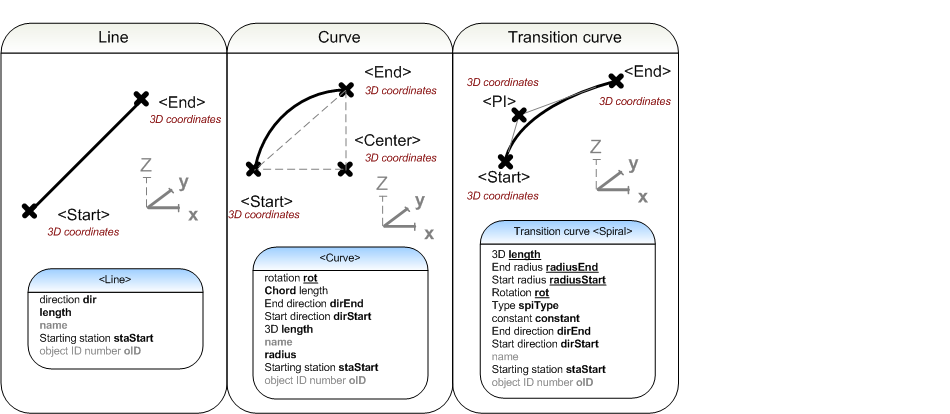
The horizontal alignment is a listing of consecutive dimenssioning components, starting from the first station equation. The precise
location of the elements is defined in terms of 3D coordinates.
Individual attributes of the <CoordGeom> element are not used.
Line
The attributes of a <Line> are the direction dir, length and start station staStart, in addition to these, the <Start> and <End> are defined in 3D coordinates.
1) Attributes of a <Line>:
|
dir |
direction
|
zero = north, in direction units
|
|
length |
length |
in length units
|
|
name |
name
|
according to the preferred element naming convention e.g.[line1] |
|
staStart |
starting station
|
|
|
oID |
object ID number |
individual identifier within the file, e.g. [2] |
2) The format for the <Start> and <End> coordinates of a <Line>, the 3D coordinates are separated by spaces.
<Start>northing1 easting1 elevation1</Start>
<End>northing2 easting2 elevation2</End>
Circular arc
The attributes of a <Curve> are the direction of rotation rot, the chord, the end direction dirEnd, the start direction dirStart, length, radius and starting station staStart. In addition, the <Start>, <Center> and <End> of the arc are defined in 3D coordinates.
1) Attributes of a <Curve>:
|
rot |
direction of rotation |
clockwise / counter-clockwise [cw | ccw] |
|
chord |
length of the chord
|
in distance units
|
|
dirEnd |
end direction |
zero = north, direction units |
|
dirStart |
start direction |
zero = north, direction units |
|
length |
3D length |
in distance units |
|
name |
name |
according to preferred naming convention e.g.[Circular arc1] |
|
radius |
radius |
in distance units |
|
staStart |
starting station |
|
|
oID |
object ID number |
individual identifier within the file, e.g. [3] |
2) The <Start>, <Center> and <End> of a <Curve>, the 3D coordinates are separated by spaces.
<Start>northing1 easting1 elevation1</Start>
<Center>northing2 easting2 elevation2</Center>
<End>northing3 easting3 elevation3</End>
Transition curve
The attributes of a transition curve <Spiral> are length, end radius radiusEnd, start radius radiusStart, direction of rotation rot, transition curve type spiType, the parameter of a transition curve constant, end direction dirEnd, start direction dirStart and starting station staStart. In addition, the <Start>, point of intersection of the end tangents <PI> and the <End> are defined as 3D coordinates. In road design the typical transition curve type is an Euler spiral "clothoid". In railway design others, e.g. third-degree spiral "cubic" are used.
1) attributes of a transition curve:
|
length |
3D length |
in distance units |
|
radiusEnd |
end radius |
in distance units, infinite = INF. e.g. [INF] |
|
radiusStart |
start radius |
in distance units, infinite = INF. e.g. [INF] |
|
rot |
direction of rotation |
clockwise / counter clockwise [cw | ccw] |
|
spiType |
type |
[clothoid | cubic | bloss | biquadraticParabola | cubicParabola | cosine | sinusoid | weinerBogen] |
|
constant |
parameter constant
|
|
|
dirEnd |
end direction |
in direction units, zero = north
|
|
dirStart |
start direction |
in direction units, zero = north |
|
name |
name |
according to preferred naming convention e.g.[clothoid-1] |
|
staStart |
starting station |
|
|
oID |
object ID number |
individual identifier within the file, e.g. [4] |
2) The 3D coordinates of the <Start>, the point on intersection of start and end tangents <PI> and the <End> are given as coordinates separated by spaces.
<Start>northing1 easting1 elevation1</Start>
<PI>northing2 easting2 elevation2</PI>
<End>northing3 easting3 elevation3</End>
3.3.2 Vertical geometry
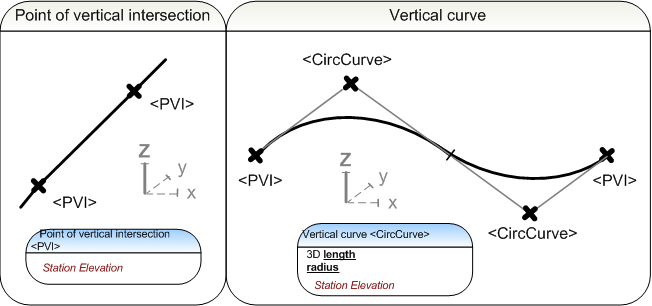
The vertical geometry is described in the <Profile>.<ProfAlign> element in concert with the horizontal geometry. The dimensioning components of the vertical geometry are:
Point of Vertical Intersection
<PVI>
Vertical curve as parabolic arc <ParaCurve> or circular arc <CircCurve>
The starting station staStart is a mandatory attribute of the vertical <Profile>.
|
staStart |
starting station |
e.g. [0.000000]
|
The name of the vertical geometry <ProfAlign> is a mandatory attribute:
|
name |
name |
e.g. [va1]
|
Point of vertical intersection
The first and last element of the vertical profile is always a Point of Vertical Intersection <PVI>.
A Point of Vertical Intersection <PVI> marks the ends of the line segments of a vertical geometry. A Point of Vertical Intersection is defined by a station and an elevation as space separated values.
<PVI>station elevation</PVI>
The <PVI> has attribute description desc.
|
desc |
description |
e.g. [vertical alignment start]
|
Vertical curve
Vertical curve arcs may be combined into S-curves or compound curves. The first or last element of a vertical profile is never a curve (vertical parabolic arc <ParaCurve> or vertical circular arc <CircCurve>).
Parabolic:
The <ParaCurve> is defined by attribute length and by space separated station and elevation values for vertical intersection point.
<ParaCurve>station elevation</ParaCurve>
The mandatory parameter of a vertical parabolic arc is horizontal length length measured along horizontal alignment.
|
length |
horizontal length |
in distance units |
Circular:
The <CircCurve> is defined by attributes length and radius, and space separated station and elevation values for vertical intersection point.
<CircCurve>station elevation</CircCurve>
The mandatory parameters of a vertical circular arc are horizontal length length (measured along horizontal alignment) and radius radius.
|
length |
horizontal length |
in distance units |
|
radius |
radius |
in distance units,
negative (-) when the below the starting point, e.g. [-100.000000]
positive (+) when above the starting point, e.g. [98.500000] |
3.4 Line strings
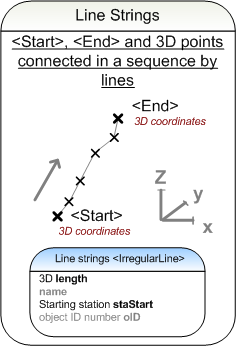
Line strings are defined in concert with the horizontal geometry <CoordGeom>. Line strings are defined as a series of 3D points, hence not needing a vertical <Profile> element. The dimensioning element of a line string is:
<IrregularLine>
3.4.1 String line
A string line has optional attributes and sub-elements to define its <Start>, <End> and the intermediate points <PntList3D>.
1) Attributes of the <IrregularLine>:
|
length |
length
|
in distance units |
|
name |
name |
e.g.[stringline1] |
|
staStart |
starting station |
|
|
oID |
object ID number |
individual identifier within the file, e.g. [5] |
2) The <Start> and <End> points of an <IrregularLine>, individual coordinates are separated by spaces.
<Start>northing1 easting1 elevation1</Start>
<End>northing2 easting2 elevation2</End>
3) The 3D point list <PntList3D>, consists of 3D coordinates of intermediate points and start and end points, separated by spaces.
<PntList3D>northing1 easting1 elevation1 northing3 easting3 elevation3 northing4 easting4 elevation4...northing2 easting2 elevation2</PntList3D>
3.5 Route line string model
An alignment group <Alignments> is a collection of geometric alignments and lines strings. The line string model of a route is composed of the line string descriptions in the collection, ordered into layers. The order of alignment descriptions within the alignment group does not matter.
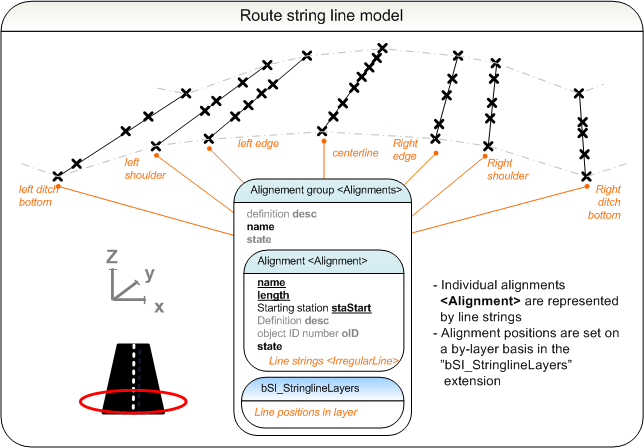
The line string model of a route composed of <Alignment> descriptions is defined using the bSI_stringlineLayers extension placed under the <Alignments> where the alignment descriptions are found. The line string model consists of individual line strings, described layer by layer in the bSI_stringlineLayer child elements. The order of the <Alignment> elements is irrelevant, as their unique names are used as alignment identifiers <Alignment>.name. Each layer of the line string model is assigned a unique name and the name-references to the alignments it contains. It is optional to define a centerline and set the surface type codes bSI_coding.
The procedure for constructing a new layer in the line string model using the bSI_stringlineLayers extension is:
1) The layer is assigned a unique name.
2) The constituent line string alignments are selected by referencing the line strings by their names <Alignment>.name going from left to right as comma separated list.
3) The centreline may optionally be set.
4) The coding and codingDesc values may optionally be set in bSI_coding extension.
A line string may belong to several different layers. The layers shall be defined in top-down order. The line string model sample below utilizes the general surface coding. The sample describes a road surface and the underside of the lowest structural layer.
bSI_stringLineLayers <Feature>
|
name |
optional name |
e.g. [8] |
|
code |
code |
[bSI_stringlineLayers] |
|
source |
source |
[bSI_LandMVD] |
bSI_stringLineLayer <Feature> - Layer 1 of the line string model
|
|
|
name |
optional name |
e.g. [9] |
|
|
code |
code |
[bSI_stringlineLayer] |
|
|
source |
source |
[bSI_LandMVD] |
|
|
label |
[name] |
name of the layer
|
value |
e.g. [road surface] |
|
|
label |
[alignments] |
alignments of the layer, left to right
|
value |
e.g. [LeftEdge,stationing_reference_line,RightEdge] |
|
|
label |
[centreline] |
centerline of the layer
|
value |
e.g. [stationing_reference_line] |
| bSI_coding <Feature> |
|
|
name |
optional name |
e.g. [10] |
|
|
code |
code |
[bSI_coding] |
|
|
source |
source |
[bSI_LandMVD] |
|
|
label |
[coding] |
surface code |
value |
system code,
e.g. [InfraBIM:201000] |
|
|
label |
[codingDesc] |
description of the surface code |
value |
description of the surface system code,
e.g. [Topmost layer] |
| bSI_stringLineLayer <Feature> - Layer 2 of the line string model |
|
|
name |
optional name |
e.g. [10] |
|
|
code |
code |
[bSI_stringlineLayer] |
|
|
source |
source |
[bSI_LandMVD] |
|
|
label |
[name] |
name of the layer |
value |
e.g. [underside of the structure] |
|
|
label |
[alignments] |
alignments of the layer, left to right |
value |
e.g. [LeftEdge_underside,stationing reference line_underside,RightEdge_underside] |
|
|
label |
[centreline] |
centerline of the layer |
value |
e.g. [stationing_reference_line_base] |
| bSI_coding <Feature> |
|
|
name |
optional name |
e.g. [10] |
|
|
code |
code |
[bSI_coding] |
|
|
source |
source |
[bSI_LandMVD] |
|
|
label |
[coding] |
surface code |
value |
surface system code,
e.g. [InfraBIM:201100] |
|
|
label |
[codingDesc] |
description of the surface code |
value |
description of the surface system code,
e.g. [Bottom of structure] |
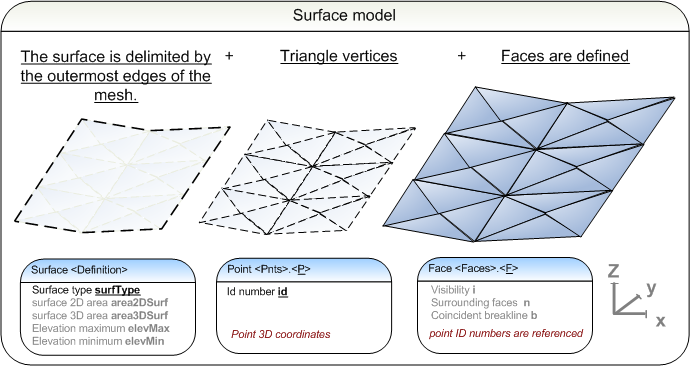
3.6 Surface model of a route
The surface representation is described in detail in section 2 Base data. The surface model consists of:
Triangle vertices,
Faces
optional surface type coding
3.7 Structural model of a route
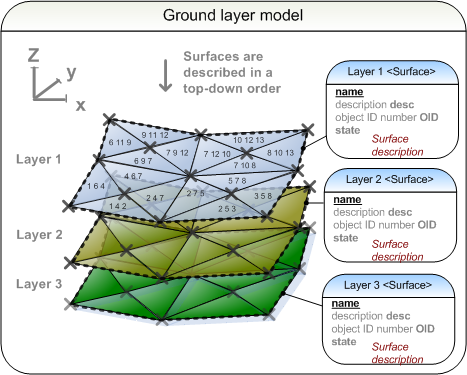
The structural model of a route contains the surface models of all structural layers. The layers shall be described top-down. The surface representation is described in detail in section 2 Base data.
3.8 Cross-section parameters
Cross-section parameters refers to parametric information that expands on the line string model information. The cross-section
parameters contain information about the superelevation of roads.
The relevant cross-section parameters are set under <Alignment>.<CrossSects>.<CrossSect> in the extension bSI_crossSect, as described for each route type in further detail in the corresponding section of this documentation. Type codes may also be assigned to cross section by bSI_coding.
3.9 Bridges
The bridge locations on a route can be given under <Roadways>.<Roadway> as bridge elements <BridgeElement>. Each bridge is located on the <Alignment> referenced by its parent <Roadway> by attributes staStart and staEnd, with optional width and projectType.
Attributes of <BridgeElement>:
|
staStart |
start station |
e.g. [1850.0000] |
|
staEnd |
end station |
e.g. [2458.0000] |
|
width |
nominal bridge width
|
in width units
|
|
projectType |
bridge state
|
[new | existing]
|
3.10 Plan features
The planimetric features such as building footprints, fences, guard rails, lightpole or signage that are assigned to a particular route are described under <Roadways>.<Roadway> as plan features <PlanFeature>. The plan features may have their details described in the bSI_planfeature and type codes assigned by bSI_coding extension, and can have <Location> and also geometry as <CoordGeom>.
The planimetric features not directly assigned to any particular roadway are described under plan features collection <PlanFeatures> as <PlanFeature> elements.
Attributes of <PlanFeatures>:
|
desc |
description |
e.g. [Steel mesh fences type T2] |
|
name |
unique name |
e.g. [A_fences_T2] |
|
state |
state
|
[abandoned]
[destroyed]
[existing]
[proposed] |
Attributes of <PlanFeature>:
|
desc |
description |
e.g. [Road sign footing] |
|
name |
unique name |
e.g. [footing12] |
|
state |
state
|
[abandoned]
[destroyed]
[existing]
[proposed] |
<PlanFeature> geometry may be described in <CoordGeom> using line strings. Its location can be given in <Location> element as a two or three dimensional point:
<Location>northing easting (elevation)<Location>
Details of plan feature in bSI_planfeature <Feature>:
|
name |
optional name |
e.g. [9] |
|
code |
code |
[bSI_planfeature] |
|
source |
source |
[bSI_LandMVD] |
|
Parameters <Property> |
|
|
label |
[type] |
type of plan feature
|
value |
e.g. [fencing] |
|
|
label |
[material] |
material of the plan featerure |
value |
e.g. [aluminium] |
Coding of plan feature in bSI_coding <Feature>:
|
name |
optional name |
e.g. [10] |
|
code |
code |
[bSI_coding] |
|
source |
source |
[bSI_LandMVD] |
|
label |
[coding] |
type code of the plan feature
|
value |
e.g. [TIEL:95] |
|
label |
[codingDesc] |
type code description
|
value |
e.g. [Fences] |

